hit counter

July 5th, 2008 : Firework Photos

Here are my top three photos from July 4th, 2008.

Squiggle over Lake

Lake of Fire

Purple on Lake (Cropped)

July 1st, 2008 : Building a Computer Desk: Part 1

Several weeks back I decided to build a computer desk. I began by modeling out my idea both on paper and also in Google Sketchup. (Links to the video are in the post New Computer Desk.)

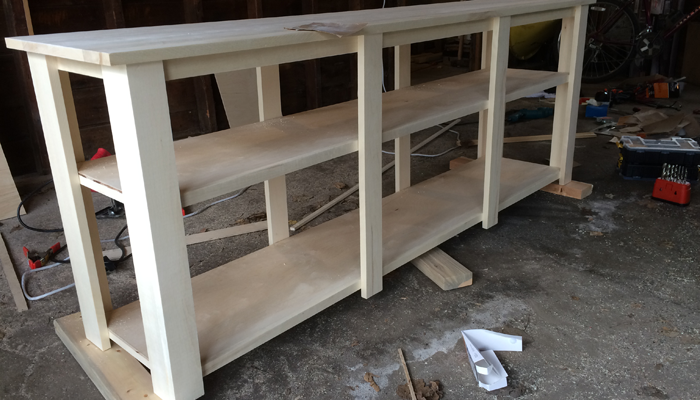
Packaged WoodToday I took the plunge and bought the wood I would need. Total price was $320. I had hoped to spend less than $200 on wood, but the boards only came in 6 foot lengths, rather than 8 foot lengths. Had I taken more notice of this in earlier shopping, I might have been better prepared, but I was able to grab what I needed without too much rethinking of plans.

My wood options were rather limited, the only two options I was given were Pine or Aspen. (I could have gotten oak, but it was far too expensive and would have required much more work.) I had already decided to go to with Aspen.

I bought 10 boards, 3 - 1″x24″x6′ boards, 6 - 1″x12″x8′, and 1 - 1″x6″x8′. (My original plans were more along the lines of 3 - 1″x24″x8′ boards, 3 - 1″x12″x8′, and 1 - 1″x6″x8′. This means that I will be needing to glue some of the 12″ boards together to obtain more 24″ boards.)

Stained BoardI brought the boards home and began to stain them. My original vision was to have a lighter colored desk, more golden in color. We didn’t have this type of stain, though, and rather then buying something new, I decided to use what we had at home and went with a walnut stain.

It’s darker than imagined, but the grain on the wood is amazing. It looks wonderful, and I am very happy with it thus far.

I stained all of the boards on one side and a stained the most boards on the second side as well. Tomorrow I will finish my staining and should be able to start cutting out the pieces.

I will be posting the updates on my progress as I have time, and new photos will be posted to my flickr account. Hopefully will be able to post up my blueprints when I am able to scan them in as well.

June 24th, 2008 : New Computer Desk

This next semester I will not be living in the dorms on campus and as a result I will be needing to furnish the rooms where-in I will be living. I have decided that I need a nice computer desk to work with and I have decided that I want to build it myself.

I have done my research and over the next week or two I’ll be finalizing the blueprints so that I can start the building process sometime mid July. I’ll be posting updates as the project moves along.

If you want to see a 3D fly through of the desk, I have both a Quicktime Movie and a Youtube Version. (Quicktime has better frame rate.)

June 12th, 2008 : Purity

xkcd

dive into mark

Although, I have to say, there isn’t much point to any of those fields, if you can’t communicate your findings/theories/knowledge to a future generation… (But I’m not good enough to do a comic of that…)

(EDIT: actually entered the photos, both for better user experience and a test with some other things I am working on.)

June 10th, 2008 : TechPhobia.info

I am about to try something new. In the back of my mind I have been toying with the idea of creating a website to help teach people about technology. I like learning new things and I find both enjoyment and challenge in explaining the concepts that I take for granted to people who have no technical knowledge.

For the past year I have been writing short three to five hundred word articles for my college newspaper on technology. I decided I want to take that to the internet.

This new site is a calculated whim. I have toyed with the idea, but never to any great extent. I know there are a lot of sites out there attempting to explain technology. I didn’t go and look at any of them. I bet there are probably some really good ones out there, but I have decided that I want to try my hand at one and I think I can do just as well, if not better, than the next guy.

The target audience is multi-faceted. My number one target is people who haven’t experienced technology before and need help finding there way around. I also want to help people who use their computer for paper writing, email checking and Facebook, but don’t know what else their computer will do. Finally, I would like to deal with a few issues that are more in depth and perhaps require more experience. As a side objective I would also like to develop a list or database of questions that new users have and concepts that new users don’t understand so that developers, designers and creators can see where users have problems.

I have a few concerns about this project. The first concern I have is getting traffic to the site, I have never been very good at advertising, but I have also never done something like this before. My biggest concern is finding my content level. I want to start out with the extreme basics, I don’t want to leave people in the dust, but I also don’t want to insult people by simplifying things too much.

Targeting this group of people is also hard because these people are not going to be out surfing the net looking for this type of information. I’m not sure how I will combat this, but I’ll figure that out as I go.

I acknowledge that these are lofty goals and it won’t be easy, but this is what I like to do. I like to dive into technology and I want to see if I can make this take off.

Without further introduction, I announce my newest venture: TechPhobia.info

June 7th, 2008 : Apple Launches Keynote Podcast

All I have to say is that it’s about time. I’ve been saying they should do this for the past three years.

June 6th, 2008 : Freeing Up Hard Drive Space

Just quit Photoshop, which freed up 105GB of Hard Drive space. Yeah, that’s one big Photo… (Actually, that was me stitching 68 photos together with Photomerge.)

Here’s a drive space summary with Photoshop running:

And here’s a look at after quitting Photoshop:

June 2nd, 2008 : Rolling Down the Hill

Technology has reached a point where consumers are literally afraid of their electronics. They are not afraid that the electronics will attack or hurt them, but rather afraid that if they touch something, they will break it. This has several implications, which are rather discouraging for the more tech minded individuals.

To begin, allow me to illustrate the problem.

Let’s say that you develop the concept of a car. You design a car, you engineer a car and you are finally able to build a car. After finishing this tremendous project, you take it out and show it to people. You say, “Look at this! It’s a car! Isn’t it neat? You can have it! Go ahead and use it!”

After leaving the car in their hands, you leave, only to return several hours later to find twenty or thirty people pushing the car to the top of a hill, climbing onto the roof, and riding the car down the hill. You look on in horror as the car smashes into a tree, at which point everyone picks themselves up off the ground, brushes themselves off, and begins to push the car up the hill again.

This is not at all what you expected, so you try to explain: “Wait! Look, see? You can open the door and go inside! There’s a steering wheel! You can make it turn! There is a radio, you can listen to music! There are breaks, so you don’t hit trees! Why are you pushing it up the hill?! You could drive it up the hill, in fact, you could drive it down the hill, or anywhere you want! You can use it for so much more? Don’t you see!?!?”

The problem that we face is the result of many issues. The first being:

Features are not immediately obvious.

The people building the technology take their work for granted. They added or designed features that made sense and they understand it perfectly. It’s completely obvious to the builder that a car should have a steering wheel. Isn’t that common sense? You should be able to set the home page on your web browser, right? Doesn’t everyone know that? In short, no. It’s an additional feature, not a requirement, and as such many people will not even think about it.

Users don’t always understand the language used.

???????? ????? ????????Why do you go to “Preferences” to change the settings? How is someone suppose to know that? Take a look at the screenshot to the right. Check out the keyboard shortcut for “Paste and Match Style.” What on earth is that symbol? I don’t know about you, but I don’t have any keys on my keyboard which even remotely match that first symbol. What’s with the up arrow? Is that the up arrow key? (No, it’s the shift key.) How do we expect people to know this? Now take a look at “Complete.” First off, even I don’t even know what “Complete” does and secondly, what on earth is that circle with that arrow? How is this not confusing?

If users don’t understand what a feature does, it doesn’t matter if they can find it or not. Granted, helping them to find the feature is the first step, but they are not going to go out looking for the feature unless they either know that it should be somewhere or they just want to dabble around. The users are more than happy to ride the car down the hill. It’s fun and exciting, it does what they want. Why do they need more?

Users are afraid of breaking things.

If a user has something that works for their needs, they have no reason to go and change anything. It might break something, and if it does break something, they may not be able to put it back to how it is now.

This ties in greatly with the last issue. If users don’t understand what is being said, they won’t use the feature because they don’t know what it does. But they are afraid to try new things because they fear that doing something they don’t understand will completely break what they have.

In some respects, this is a good fear to have. Users shouldn’t go around deleting random files from their system folder. (Or for that matter, any files from their system folder.) When it comes to learning more about their computer and features that they have, it is counter productive.

I don’t really know why I should put this smelly liquid in my car. What if that means I can’t ride it down the hill? What if that breaks it? What if that’s not suppose to go in there? I’m fine how I am, I won’t touch anything.

What can we do about it?

The solution is not a simple project. The good news is that the younger children today are becoming much more adept at working with the newer technology. The learn quickly and are more willing to try new things. It’s the older generation of users that will need more help in learning their way around things.

For the consumers we need to find a way of explaining the features, the language and how to explore the program. Once the users begin to understand, they will be much more capable of handling issues on their own.

While educating people about technology, though, it is important to also educate the technology creators and designers so that they understand how to view their design as if they are a first time user.

Before I end, let me give one example of a cool new feature which I think is really a great step in the right direction.

Apple has done a really neat thing with the Help menu in Leopard. The Help menu contains a search box which not only searches thee help documents, but also searches the menus for options. This is a great feature to help explore the program and to find features. We need more things like this.

May 29th, 2008 : Choir Tour 2008

For the past eleven days I have been on Choir Tour. Those following me on Twitter have been receiving updates along the trip. For the purpose of creating an archive of events, I am here posting the whole of Choir Tour (at least in my perspective) in 140 character chuncklets.

I did a bit of cleanup on sections where I made mistakes with typing on my phone. I decided not to worry about punctuation and capitalization.

Friday, May 16

Choir Tour Leaves tomorrow @ 9:00am. I’m running@ about 1/8th my current tech setup. 7:43 PM

Saturday, May 17

Killing time till Choir leaves. Listening to Jonathan Coulton. Enjoying the lack of pressing work. 7:19 AM

Busses mostly packed. Gathering for pre-trip brief. 8:50 AM

On bus waiting to leave… 9:14 AM

Leaving Bethany Lutheran College! 9:27 AM

First rest stop. Windy and dusty. Played frisbee.11:18 AM

Lunch stop in Sioux City. 1 hour break. 12:55 PM

Watching Transformers. Screens are too small and the volume too low. Still good though. 3:32 PM

At the church, concert in 1 hour. 4:01 PM

Concert is starting now. Walking to the front. 5:28 PM

Concert went well, supper was excellent, 1.5 hour drive to hotel. 07:55 PM

Hotel goofed up, lost our reservation. Guess we are looking for a new place to stay. 09:50 PM

At a new hotel. Got an internet connection set up. Wireless and insecure, but I’m just checking in on Twitter. 10:31 PM

Sunday, May 18

Up early, breakfast and on bus to first concert. 06:59 AM

setting up at church, concert in 1 hour. 07:46 AM

Another amazing meal, now it is nap time. 10:42 AM

Looking for things to do in Branson, MO on Tuesday. Have the whole day free. Any suggestions? 12:49 PM

loading bus to go to second concert of the day. 04:47 PM

Being fed again! Yummy! 05:21 PM

This church is amazing meal and great sounding sanctuary. 06:35 PM

Monday, May 19

Breakfast time. Concert at Waco NE this morning. 07:39 AM

Just walked to Starbucks for a latte. Bus leaves in 45 min. 08:11 AM

Concert went well. Rest of the day: bus ride. 10:47 AM

still on bus. stopped for lunch at noon-thirty. still have a ways to go. 03:25 PM

bus ride feels unending… Another hour or two left… Back to playing with my ds. 05:55 PM

Finally arrived at Precious Moments Hotel. Woot! Done with driving, time for Frisbee or swimming or ANYTHING besides being on a bus. 06:47 PM

Supper is almost the same as lunch: peanut butter sandwich. With the addition of Pringles and a double cheese burger. 07:36 PM

I love the smell here in Carthage. Very nature-y. 08:22 PM

Tuesday, May 20

Up, showered, headed to breakfast. Bus leaves for Branson MO around/after 8:30. Sounds like a group is headed to the beach… 07:17 AM

Driving around Branson, MO. 10:50 AM

Walking to the dam at benson 03:02 PM

Walking to the Stone Hill Winery, them to find supper. 05:49 PM

just finished the winery tour. Time to find some dinner. 07:43 PM

Chinese for supper. 08:18 PM

Wednesday, May 21

Breakfast was the best yet. Two hours till departure. 07:57 AM

Loading the bus and heading to the Titanic museum. 10:07 AM

Just made it through the Titanic museum. I died. But I helped to save many others. 11:56 AM

lunch break. Saving money… No mcflurry… Sadness! :( 02:01 PM

Arriving at the next church. 05:11 PM

At hotel for night. Concert went well. My throat is scratchy… must not get sick! 09:24 PM

Off to bed for the night. Load time tomorrow is 9:30 (I think…) Desperately want my throat to not be sore tomorrow. 11:20 PM

Thursday, May 22

I’m up and headed down to breakfast. Roommates still sleeping, buss leaves at 9:30? 07:46 AM

Loading bus and leaving. Next stop: St. Louis. 09:39 AM

Walmart stop for lunch and cold medicine 11:24 AM

Arrived at Missouri History Museum. 01:25 PM

done at museum. 2 hours to next stop. Time for chips and salsa. 03:04 PM

at the next church. 05:14 PM

Amazing meal. Rhubarb pie. Nuf said. 06:10 PM

stupid hotel doesnt have free internet. Stupid hilton. 10:23 PM

Frisbee on top level me parking ramp. w00t! 11:17 PM

Friday, May 23

wandering around spring field. Lincoln-y stuff. 10:12 AM

Toured some Lincoln sites. Back to hotel for lunch. Roommates are still sleeping. 11:43 AM

Off to library and them capital. 12:32 PM

Off to cold stone for had cream. 06:38 PM

Going to see Prince Caspian. 06:56 PM

Saturday, May 24

load and leave at 7 am this morning. 06:46 AM

Stop at McDonalds I guess this is breakfast. 09:08 AM

stopping for lunch in madison wi. 11:58 AM

In West Salem for 4 o’clock concert. Supper to follow. 02:58 PM

concert done, food time. (i like singing before eating as opposed to singing after eating.) 05:36 PM

frisbee! 06:20 PM

back on bus. headed to hotel. 06:24 PM

Finally! A Hotel with good Internet! 07:15 PM

@boblmartens Okay, your right… it is kinda slow, but at least it doesn’t cost $10 a night! 07:55 PM

Just got done playing an hour of ultimate frisbee. SO excited! 10:11 PM

Sunday, May 25

Far too early to be up… Bus leaves at 6:45 06:30 AM

first service done, i need a nap before round 2 09:27 AM

second concert done. dead tired. food time. Legs cant support self. 11:58 AM

Loading bus and off to next stop: 12:49 PM

arriving in wisconsin dells 02:24 PM

No internet at this hotel. so, not only am i starving, but i cant use google maps to find food. 07:28 PM

Monday, May 26

beautiful morning today. great time to explore while choir mates sleep. 07:39 AM

at tanger outlet mall looking around, killing time. should really find some cheese curds. 10:33 AM

Got cheese curds. eating cheese curds. 11:06 AM

Heading to madison for a 4 o’clock concert. 01:26 PM

setting up at grace lutheran for the concert. 02:53 PM

fruit buffet for pre concert snack. Watermellon, grapes, cherries, oranges, apple slices. (My headache has slightly subsided). 03:31 PM

hottest concert yet, it was hot in there. 05:09 PM

done swimming for the night. Pool is closed. 09:01 PM

Tuesday, May 27

Lunch break. headed to dennys. 11:57 AM

Stopping to ride the ducks. 01:02 PM

finished the duck tour, headed to our final stop of the tour! 02:20 PM

Arriving in eau claire. Last stop before home. 04:39 PM

Brats for supper. Concert at 7. 05:32 PM

One more concert to go, home concert tomorrow at 7:00pm 08:23 PM

On the road back to mankato, mn 09:18 PM

Arriving in mankato. soon to unload busses and go to bed. 11:49 PM

Wednesday, May 28

Home Concert is at 7:00, choir meets to setup, warm-up and robe-up at 5:30. 05:07 PMConcert over. Packing up, heading home. Choir tour is done.

May 13th, 2008 : A Study on Studies: Daydream

Final Day

Daydream 1

Daydream 2

??????Daydream 3